SimsAIChat
A downloadable mod for Windows
SimsAIChat: True AI Roleplay for The Sims 4
Stop imagining what your Sims are saying. Start talking to them.
🚀 What is SimsAIChat?
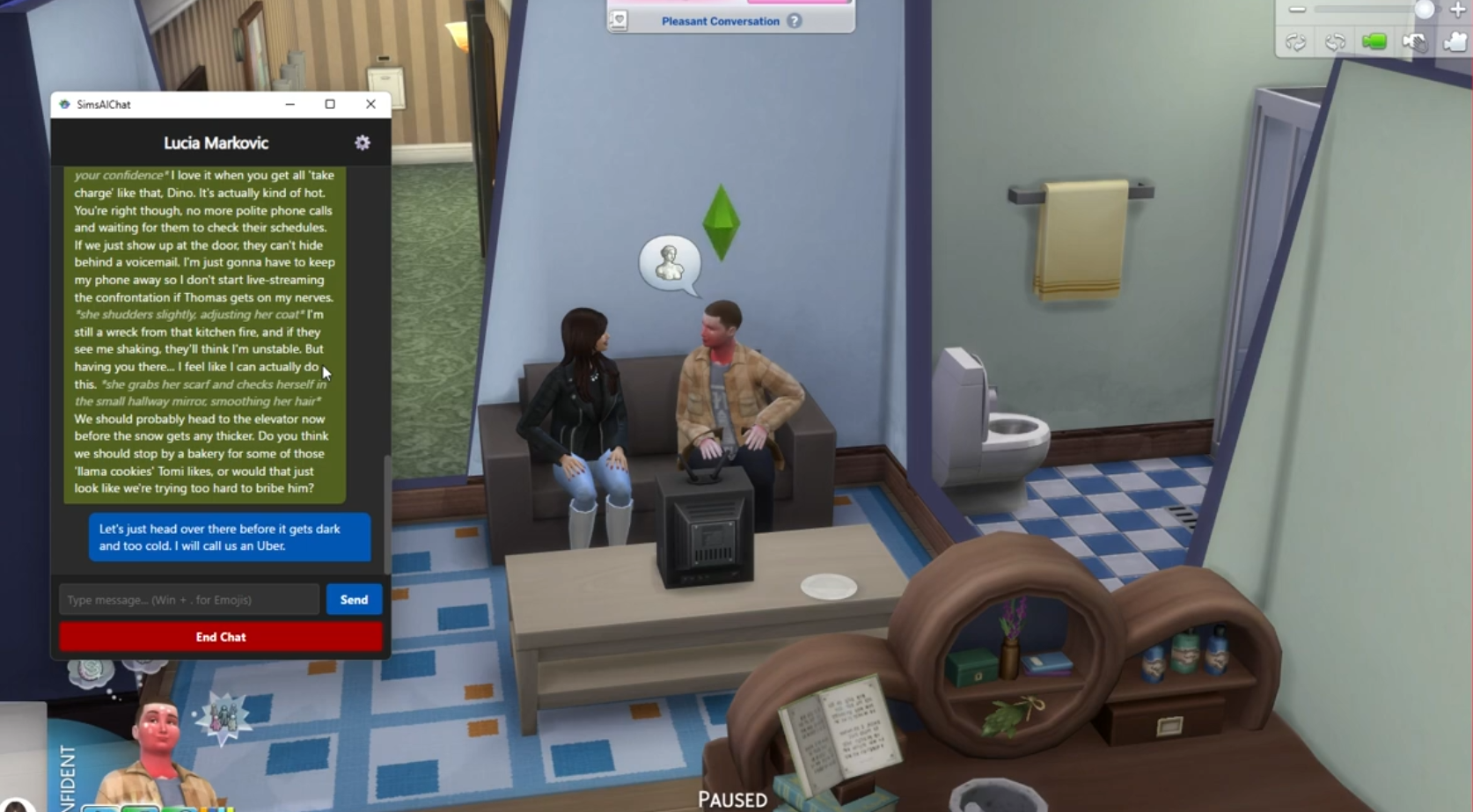
SimsAIChat is a revolutionary mod that connects The Sims 4 to advanced Artificial Intelligence (LLMs). Instead of repeating the same generic lines, your Sims can now have deep, context-aware conversations based on their actual gameplay data. This isn't just a chatbot. It is a "Brain" for your Sims that knows who they are, where they are, and how they feel.
✨ Key Features
- 🧠 Deep Context Awareness: The AI reads your Sim's data in real-time. It knows their Traits, Career, Skills, Relationships, Current Mood (Buffs), and what they are currently doing. A "Snob" Sim will sound like a snob; a "Gloomy" Sim will sound depressed.
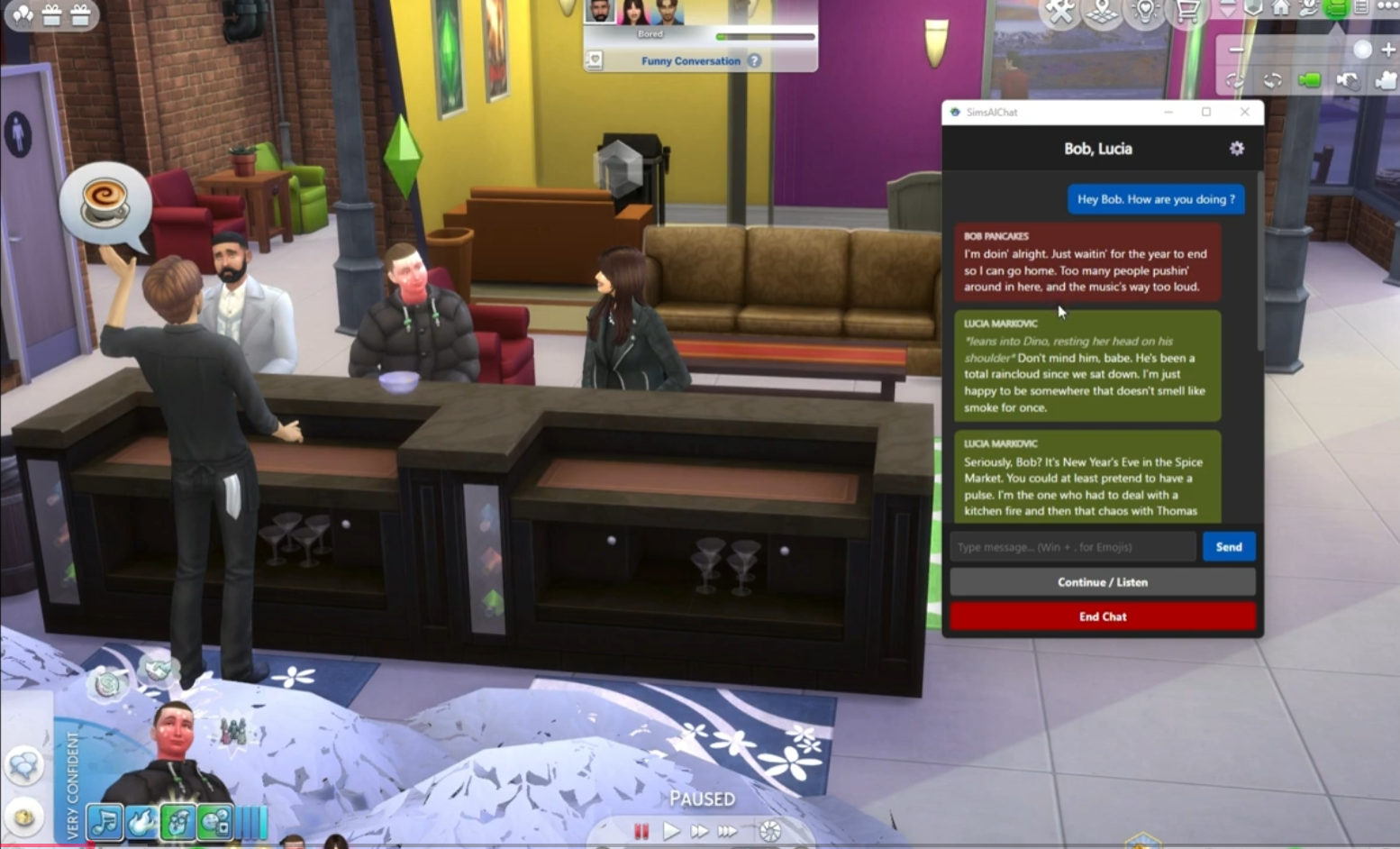
- 🌍 Location Awareness: The AI knows where you are! Whether you are at a bar in Oasis Springs or the Spice Market in San Myshuno, the AI incorporates the surroundings into the conversation. You can even add custom visual descriptions for your specific lots.
- 💾 Long-Term Memory System: The mod remembers. If you have a significant conversation, the AI generates a summary and saves it to a local database. The next time you talk to that Sim, they will reference what you discussed previously.
- 👥 Group Chat Support: Select up to 3 Sims nearby and enter a Group Chat. The AI controls all of them simultaneously, allowing them to banter, argue, and interact with each other (and you) dynamically.
- 🤖 Multi-Model Support: You choose the brain. Fully compatible with:
- Google Gemini (Recommended for free, high-speed usage)
- OpenAI (ChatGPT) (GPT-3.5/4/4o)
- DeepSeek & OpenRouter
- 🌐 Multi-Language Support: Native language not English? No problem. You can set the output language in the settings (Spanish, French, German, Japanese, and more), and the AI will translate the roleplay automatically.
⚙️ How It Works (The Architecture)
SimsAIChat utilizes a "Triangle Architecture" to bring high-power AI to the game without lag.
- The Mod (.ts4script): Scrapes data from the game engine.
- The App (.exe): A lightweight desktop client that processes the logic and connects to the AI Provider.
- The UI: A modern chat window that overlays your game.
⚠️ IMPORTANT: Because this mod uses an external application (.exe) to connect to the AI, Windows Defender or your Antivirus may flag it as a "False Positive." This is normal for indie modding tools that are not digitally signed by a major corporation. You may need to whitelist the folder.
📥 Installation Guide
Step 1: Requirements
- Windows 10 or 11 (64-bit).
- Sims 4 Community Library (S4CL) (Mandatory Dependency).
- An Internet Connection.
Step 2: Install Game Files
- Extract sims_ai_chat.ts4script and SimsAIChat_Menu.package into your Sims 4 Mods folder.
- Download sims_ai_chat.ts4script and SimsAIChat_Menu.package and place them into your Sims 4 Mods folder.
- Ensure "Script Mods Allowed" is enabled in your game options.
Step 3: Install the App
- Extract SimsAIChat.exe to a folder on your Desktop or Documents.
- Do not put the .exe inside your Mods folder.
🎮 How to Use
- Display Setting: Set your Sims 4 Graphics mode to WINDOWED FULLSCREEN. (The chat window cannot appear on top of Exclusive Fullscreen)
- Launch: Run SimsAIChat.exe before or after starting the game. It will run silently in the background.
- Play: Click on any Sim (Teen+) -> Select "Chat with AI".
- Configure: Click the Gear icon ⚙️ in the chat window to enter your API Key (e.g., from Google AI Studio).
Credits: Built using Python, Flask, PyWebview, and the Sims 4 Community Library.
Download
Install instructions
Unlike standard mods, SimsAIChat has two parts: the Game Files and the AI Application.
Step 1: Install the Game Files
1. Open your Sims 4 Mods Folder:
○ Documents > Electronic Arts > The Sims 4 > Mods
2. Copy the following files from the downloaded zip into this folder:
○ sims_ai_chat.ts4script
○ SimsAIChat_Menu.package
○ sims4communitylib.package
○ sims4communitylib.ts4script
3. Critical: Ensure "Script Mods Allowed" is enabled in your Sims 4 Game Options -> Other.
Step 2: Install the AI App
1. Extract SimsAIChat.exe to a convenient location on your computer (e.g., your Desktop or a dedicated folder in Documents).
2. Do not put the .exe inside your Mods folder. It works best in its own folder.
⚠ Antivirus Warning:
Because this application is an indie tool and not digitally signed by a corporation, Windows Defender or your Antivirus may flag it as "Unknown" or "Unsafe." This is a false positive.
● If Windows says "Windows protected your PC," click More Info -> Run Anyway.
● You may need to whitelist the folder in your antivirus settings
Development log
Comments
Log in with itch.io to leave a comment.
hello! this looks very cool in theory, but it doesnt work on my end.. the button to start the chat is missing when i click on a sim.
It looks like the Sims 4 Community library files are no longer available on Nexus Mods. I have provided them in the Download section here. Simply place them in your Mods folder and restart the game; that should resolve the issue.